
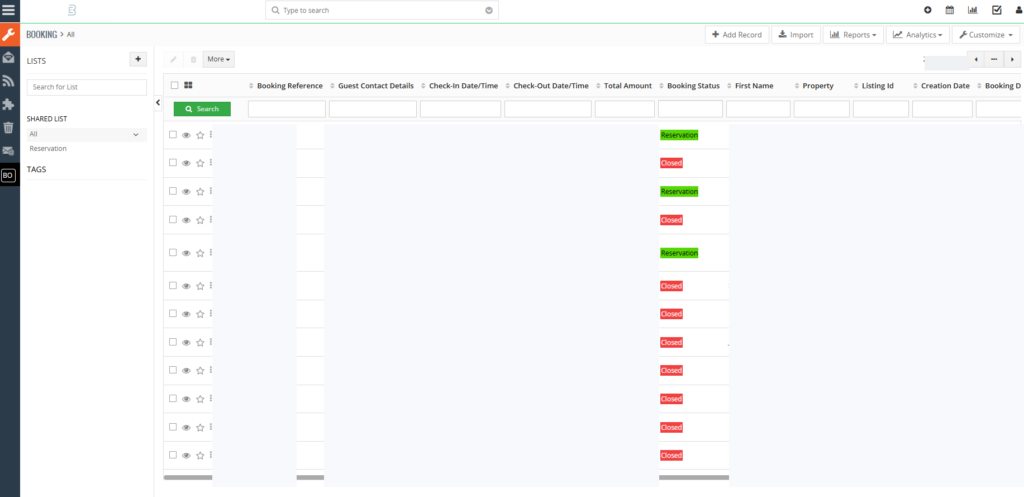
If your business runs on two tools that don’t talk to each other — a sector-specific operational platform (bookings, inventory, availability) on one side, and Vtiger CRM (customer relationships, invoices, cleaning schedules, payouts) on the other — every change in one becomes manual data entry in the other. Every booking, every price update, every cancellation turns into a copy-paste chore.
The cleaner answer is a custom Vtiger module that mirrors the operational data and keeps it in sync with the source. This post is about why that’s still a strong choice in 2026, how Vtiger compares with the other PHP CRMs you’re probably weighing, and what you actually gain from building a module instead of fighting the tool.
The business case for a custom Vtiger module
Buying a CRM is easy. Making it match the way your business already runs is hard. For operational companies — vacation rentals, hospitality, field services, logistics, agencies — the standard Accounts / Contacts / Opportunities layout fits maybe 60% of what you need. The remaining 40% is where custom modules earn their place.
A well-built custom module gives you:
- One system of record for an entire business object. A booking, a service contract, a rental agreement, a case — whatever your business calls it — lives as a first-class record in the CRM, with its own list view, detail view, custom fields, relationships, and reports. Not stapled onto Contacts as “notes.”
- Workflows that trigger on real business events. New booking confirmed → email the guest, email the owner, create a cleaning task, send a payment reminder. All automatic, all auditable.
- Reports that match the way the business is actually measured. Occupancy by month, revenue per property, cancellation rate by season, owner payouts outstanding. Built into the CRM, not maintained by hand in a spreadsheet.
- A sync target for the systems you can’t replace. If your bookings live in a sector-specific platform, your module becomes the mirror. The CRM is now the single pane of glass for operations, customer service, and finance.
- Email templates that merge the right data. The right template, filled with the right fields for that record, sent at the right moment. More on this below.
- Role-based access. Owners see their own bookings only; the ops team sees everything; finance sees the money fields. All out of the box, once the module is built right.
The alternative — a stack of spreadsheets handed between teams — is cheap to start and expensive to run. By the time you’re spending five hours a week on data entry, you’ve already paid for the module twice over.
Vtiger vs the other PHP CRMs — an honest comparison
Vtiger isn’t the only choice if you want an open-source, self-hosted, PHP CRM. Here’s how I’d position it against the realistic alternatives:
| CRM | Strengths | Weaknesses | Best when |
|---|---|---|---|
| Vtiger 8.3 | Mature. Strong built-in email templates, workflows, campaigns. Decent module system. Large community. | Smarty 3 templating is dated. Patchy official docs. Admin UI feels early-2010s. | You want the full package (CRM + email + workflows + custom modules) and don’t want to glue a stack together. |
| SuiteCRM | Modern UI (v8). Strong module customizer. Active commercial backing. | Heavier codebase. Steeper learning curve. Some modules only in the paid tier. | You want a Salesforce-like feel on self-hosted and have the time to invest. |
| EspoCRM | Cleanest modern PHP codebase. Fast. Nice REST API. Good UI. | Smaller community. Fewer third-party extensions. Less out-of-the-box CRM depth. | You’re building a CRM-shaped internal tool and value code quality over feature breadth. |
| Odoo (Community) | Enormous ecosystem (CRM + ERP + accounting + inventory). Great if you need more than CRM. | Python-based (not PHP). Steep for CRM-only use cases. Licensing complexity around Enterprise modules. | You’re actually buying an ERP and the CRM is one part of it. |
| SugarCRM / Salesforce | Mature, polished, well-supported. | Closed-source, SaaS pricing, less flexible for deep customization. | You have the budget and don’t want to run infrastructure. |
Where Vtiger wins for custom-module work: the combination of built-in email templates, workflow automation, campaigns, and a working (if dated) module API means you can build the whole operational loop — data model, UI, automation, communication, reporting — without stitching five services together.
Where it loses: if you need a slick modern UI out of the box, SuiteCRM 8 or EspoCRM are ahead. If your team hates Smarty, EspoCRM is friendlier for developers.
For most operational SMBs I work with, Vtiger is still the pragmatic choice — provided the module is built with discipline, not duct tape.
What a custom module actually ships with
The BookingRequest module I use as a reference adds a new top-level tab to Vtiger with:
- Its own list view with the fields and filters the ops team actually uses (dates, state, property, owner, net price).
- A detail view showing the booking, the related guest contact, the related property account, the owner payout breakdown, and a timeline of state changes.
- Custom fields for the financial and operational data the source system owns (
booking_state,start_date,end_date,total_price,paid_price,owner_net_price,cleaning_fee,commission_pct). - Relationships to the standard Accounts and Contacts modules — one account owns many bookings, each booking has one guest contact.
- Custom reports (Owner Revenue, Occupancy by Month, Cancellations by Season) exposed as header buttons on the list view.
- An AJAX reload + CSV / PDF export for each custom report.
- Workflows that fire when a booking is created or its state changes — send a confirmation email, create a cleaning task, notify finance, update the owner’s dashboard.
Behind the scenes, three pieces work together: the Vtiger module itself, a small PHP sync layer that pulls bookings from the external platform on a cron, and a webhook endpoint that lands the data in Vtiger. The sync layer is deliberately simple — vanilla PHP, no framework, no Composer runtime deps, flat JSON files as a local “known-bookings DB.” It runs on shared hosting without surprises.
Decisions that pay off months later
Four decisions change what the module feels like in production:
1. Fields in the base table, not the cf table. Standard Vtiger docs say custom fields live in vtiger_<module>cf. In practice, putting financial fields directly in the base table makes queries faster, reports simpler, and schema changes easier to reason about. Always verify with DESCRIBE before you start writing JOINs.
2. Idempotent writes. Every booking has a stable external ID. Replaying the same payload must never create duplicates or clobber manual CRM edits. One UNIQUE index on external_id prevents an entire category of production incidents.
3. Two cron paths, one webhook. New bookings and change detection are two different workloads. Collapsing them into one script makes failures compound. Separating them means a stuck change-detection run doesn’t delay new-booking ingestion.
4. Diagnostic-first deploys. On shared-hosting Vtiger instances with no shell access, deploys run via a token-guarded PHP endpoint. When a deploy “succeeds” but the UI stays stale, you don’t keep deploying — you run a diagnostic script that reports the mtime of each file at the source and the destination, plus the state of every known template-cache directory. The diagnostic tells you whether the problem is a partial upload, a stale template cache, or a browser cache. Saves hours.
The one small code sample worth including — adding a custom button to the module’s list view header — looks like this:
class BookingRequest_Module_Model extends Vtiger_Module_Model {
    public function getModuleBasicLinks() {
        $basicLinks = parent::getModuleBasicLinks();
        $basicLinks[] = [
            'linktype'  => 'BASIC',
            'linklabel' => 'Owner Revenue Report',
            'linkurl'   => 'index.php?module=BookingRequest&view=OwnerRevenueReport',
            'linkicon'  => 'fa-chart-line',
        ];
        return $basicLinks;
    }
}
Four lines. Returns a plain array (not a Vtiger_Link_Model object — that’s a trap). This is where Vtiger buttons actually come from, despite what most tutorials tell you.
Email templates — the feature most teams underuse
Vtiger’s email template system is one of its strongest features and the one most clients haven’t fully adopted when I arrive. Done right, it replaces every manual client email with a template that fires itself.
What you get:
- Merge fields that pull from any field on any related record:
$contacts-firstname$,$accounts-accountname$,$bookingrequest-start_date$,$bookingrequest-owner_net_price$. - HTML templates with a WYSIWYG editor — on-brand headers, logo, footer, legal boilerplate.
- Multilingual templates — a Dutch template for Dutch guests, English for everyone else, Arabic for the Gulf. Chosen by a workflow condition on the record’s
languagefield. - Attachment support — attach the PDF invoice generated by the same workflow.
- Trigger integration — a template is just a payload. Workflows and custom modules call
Emails_Record_Model::sendEmail()with a template ID and a record ID, and Vtiger merges + sends.
For a booking module, the templates I set up on day one:
- Guest booking confirmation — sent on
booking_state → confirmed. Includes dates, property name, access code, directions. - Guest arrival reminder — sent 48 hours before
start_date. - Guest departure instructions — sent on
start_dateevening. - Owner monthly payout statement — sent on the 1st of each month with a PDF breakdown of all bookings and net payouts.
- Internal alert — sent to the ops team on any new booking marked “priority.”
Each one replaces a recurring manual task. Each one looks consistent and on-brand. Each one is one WYSIWYG edit away from being updated for the whole company.
The gotcha: templates escape HTML aggressively by default. If you need raw HTML in a merge field (a payout breakdown table, say), build it as HTML in a workflow custom function and inject it into a dedicated html_body merge field — don’t fight Vtiger’s sanitizer.
Client management — getting Accounts and Contacts to work for you
Out of the box, Vtiger’s Accounts (companies / organizations) and Contacts (people) modules are decent. The win is in how you use them with your custom module:
Set a clear hierarchy. For an operational business, Accounts are usually the companies or property owners, Contacts are the guests or end users, and your custom module (BookingRequest, ServiceRequest, Appointment) is the operational object that links them. Every custom module record should have an owner-side relationship to an Account and a customer-side relationship to a Contact.
Use custom fields on Accounts for segmentation. A destination field on Accounts (where the property is) turns into a filter, a report axis, and a workflow condition. A tier field (gold / silver / standard) drives different email templates and different pricing rules.
Lean on the Activity timeline. Every email sent, every workflow fired, every status change — Vtiger logs all of it on the Contact/Account timeline. Your ops team opens one contact and sees the full history. No separate help-desk tool needed.
Deduplicate aggressively. If your sync layer creates a new Contact every time a guest books (because the external system has no stable guest ID), you’ll end up with 10 duplicate records for one person inside a year. Build dedup into the transform step — match on email first, then phone, then first_name + last_name + postal_code. Create new only when all three fail.
Automate role-based access. Owners should see their own bookings only; the cleaning team should see upcoming bookings and nothing financial; finance should see everything money-related. Vtiger’s sharing rules + custom profiles handle all of this — once configured, you don’t touch it again.
What I’d do differently next time
- Model the email templates as part of the module spec, not an afterthought. The sync-layer fields and the template merge-fields have to agree. Writing templates after the fact means retrofitting fields.
- Add structured logging from day one. JSON per request, correlation IDs, searchable in
grep. Flat text logs are fine until the first production incident. - Start the diagnostic script before writing the deploy script. Deploys fail silently in interesting ways; the diagnostic is cheaper to write first.
- Document the workflow conditions as prose, not just screenshots. A year from now, nobody will remember why “booking_state = 7 AND cancellation_reason != ‘owner'” means a refund is due. Prose outlasts memory.
If you need this done
This pattern — custom Vtiger module + external-system sync + email automation + proper client management — maps to almost every mid-market operations business I see. If you’ve got Vtiger plus a booking engine, a POS, an invoicing tool, a hotel PMS, or any other system that today lives in a spreadsheet handed between teams, request a quote and tell me what you’re trying to unify.
I also do standalone Vtiger module customization — custom fields, custom reports, custom list views, email-template setup, Mailchimp sync, deduplication, and migration from older Vtiger versions. Whatever you’ve got stuck in Vtiger, there’s probably a cleaner shape for it.
— Samoual